
Open edX has long been a favourite among organizations needing a flexible, scalable learning management system (LMS). Its open-source foundation and active community make it a popular choice for training at scale. If you're running on an older version, especially anything before Sumac you might be accumulating technical debt that puts your security, user experience, and future innovation at risk. It's not just about adding features; it's about ensuring your learning ecosystem remains stable and secure. Let's break down why the upgrade to Teak isn't just a good idea, but a necessary strategic move.
TL;DR: Upgrading your Open edX instance to the latest Teak version closes critical security gaps, unlocks modern features and better accessibility, and lays the foundation for future AI integration. Don't let an outdated platform hold you back.
First, what is Open edX? A Quick Refresher
Open edX is a free, open-source learning management system (LMS) originally developed by a joint venture of Harvard and MIT, to power massive open online courses (MOOCs). At its core, it's a robust, flexible platform that gives organizations complete control over their online learning environment. Supported by a vibrant global community, it enables you to build anything from internal corporate training programs to large-scale external training programs, including customer education. This control and flexibility are why so many leading organizations, including IBM, NVIDIA, Starbucks and FutureX choose it as their foundation.
The Risks of an Outdated Open edX Instance
Running an old version of Open edX feels fine, until it isn't. The risks of staying put on an unsupported release are subtle but significant, and they compound over time. Here's what you're up against:
Security Vulnerabilities
This is the biggest red flag. Older releases no longer receive official security patches from the community. This leaves your platform, user data, and intellectual property exposed to potential exploits that have long since been fixed in newer versions.
Feature Stagnation
The Open edX community is constantly innovating. By not upgrading, you're missing out on years of user experience enhancements, critical accessibility updates (for WCAG compliance), and powerful new functionalities that your learners and instructors expect.
Compatibility Nightmares
Technology moves fast. Key components like Python and Django are regularly updated. An older instance can lead to deprecated plugins and broken integrations with your other essential tools, creating a fragile and unpredictable tech stack.
Performance Degradation
Each new release includes countless under-the-hood improvements that enhance speed, stability, and scalability. If your platform feels sluggish or prone to errors, an outdated core is often the culprit.
What's New? Key Features in the Open edX Teak Release
So, what makes the latest version worth the effort? The Teak release is the latest stable version of the Open edX platform, offering major improvements in security, interoperability, and user experience. It's a consolidation of many recent advancements into one powerful package.
Key feature highlights of Teak include:
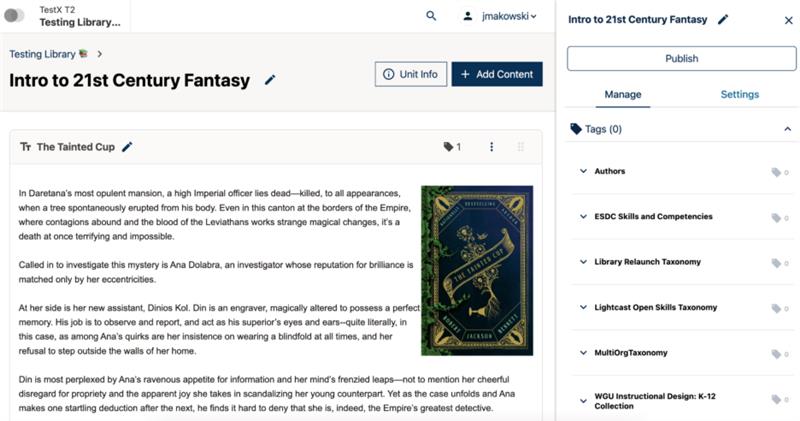
Redesigned Content Libraries
The interface for managing and reusing course content has been completely redesigned, making it far more intuitive for course teams to create, share, and update content across multiple courses.
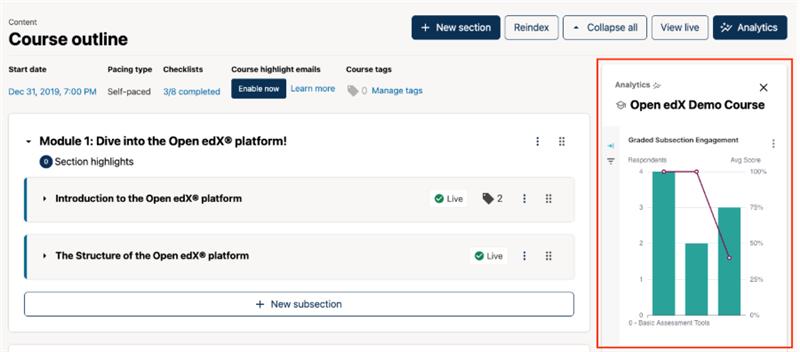
In-Context Analytics in Studio
Get immediate feedback on how your course content is performing. Instructors can now view analytics for individual problems directly within the Studio course editor, making it easier to spot where learners are struggling and improve questions on the fly.
Easier Course Imports (Common Cartridge)
Migrating content from another LMS is now much simpler. Teak adds support for the Common Cartridge format, allowing you to seamlessly import courses from platforms like Canvas, Moodle, or Blackboard.
A Faster, Modern Interface
A significant technical upgrade (to React 18) means the user interface across the entire platform is faster, smoother, and more responsive for both learners and staff, reducing clicks and waiting time.
A More Consistent Look and Feel (Design Tokens)
The platform's design system has been updated to use "design tokens," which results in a more polished, consistent, and professional appearance across all pages and components.
For a full technical breakdown, you can always consult the official Open edX Teak Release Notes.
Still on an Older Version? Here's What You've Missed
If you're running a version that's more than a couple of years old (like Maple, Lilac, or even older), the feature gap is even more dramatic. You haven't just missed Teak; you've missed the whole evolution of the platform. Here are a few key milestones you've skipped over:
| Release Name | Key Feature Updates in the Release |
|---|---|
| Palm |
|
| Quince |
|
| Redwood |
|
| Sumac |
|
Each of these builds on the last. The jump from a version like Lilac to Teak isn't just an update; it's a total platform transformation.
Planning Your Upgrade to Teak: A 3-Step Overview
An Open edX upgrade requires careful planning but can be managed smoothly by following a structured process. While every instance is unique, the core steps are universal:
1. Audit & Backup
Begin by thoroughly auditing your current instance. Document all custom themes, third-party plugins, and specific configurations. Once you have a clear picture, perform a complete backup of your database and server environment. This is your safety net.
2. Stage & Test
Never upgrade your live production server directly. Create a staging environment that is an exact clone of your production setup. Run the upgrade process here first. This allows you to identify and fix any theme incompatibilities, broken plugins, or data migration issues without impacting your users.
3. Deploy & Verify
Once you're confident the upgrade is stable on the staging server, schedule a maintenance window with your users. Perform the upgrade on the production server, and afterward, conduct a thorough post-launch check to ensure everything is working as expected.
The Real Goal: An AI-Powered Learning Cloud, Not Just an Update
Let's be clear: completing an Open edX upgrade is not the finish line. It's the starting line.
The real goal isn't just to be on the latest version; it's to have a stable, secure, and modern platform ready for the future of learning which is undoubtedly driven by AI. An up-to-date Open edX instance is the essential foundation you need to start exploring AI-powered course creation, personalized learning paths, and agentic learning experiences.
This is where Blend-ed comes in. We built our Agentic AI Learning Cloud on top of the powerful Open edX core because we believe in its flexibility and robustness. We handle the burden of maintenance and upgrades for you, ensuring you are always on the latest, most secure version. This frees you up to focus on what truly matters: creating incredible learning experiences.
If you're ready to stop worrying about platform maintenance and start building the future of learning, let's talk.
Schedule a Demo of Blend-ed TodayFrequently Asked Questions about Open edX Upgrades
Q1: How long does an Open edX upgrade take?
A: The timeline can vary from a few weeks to several months. It depends heavily on the age of your current version, the complexity of your customizations (themes and plugins), and the size of your database.
Q2: Can I skip versions when upgrading? (e.g., from Lilac directly to Teak?)
A: Yes, it is generally possible to upgrade across multiple versions. However, the larger the jump, the more complex the data migration and the higher the risk of conflicts. Each intermediate release had its own database changes, so a direct multi-step upgrade requires expert handling.
Q3: What are the biggest challenges during an upgrade?
A: The most common challenges are outdated or incompatible plugins and custom theme conflicts. The shift to micro-frontends (MFEs) in recent years means older themes often require a significant rewrite to function correctly with versions like Teak.