
Key Takeaways
What is a branded client portal for a training provider?
It is one isolated, fully branded learning environment per corporate client, run from a single platform. Each client gets their own space, their own people, and their own look.
How much can be branded for each client?
Logo, colours, certificates, email templates, and the mobile app. The experience reads as the client's own brand from login to certificate.
Do clients get their own admin access?
Yes. Each client gets an admin login scoped to only their own learners. They never see another client's people or data.
Is client data kept separate?
Yes. Full data isolation means no client can see another client's learners, results, or reports.
What does the web address look like for each client?
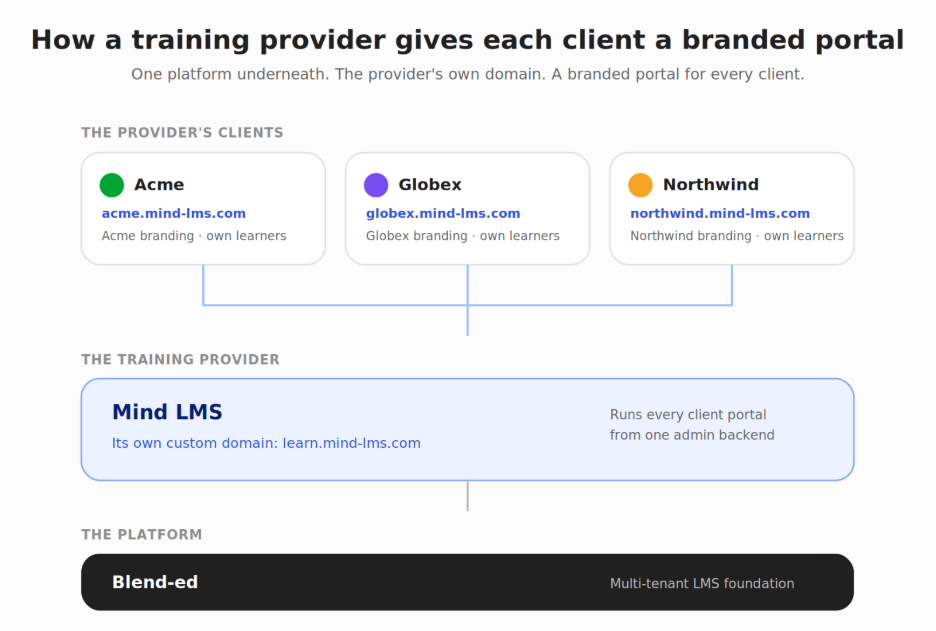
You get your own custom domain as the training provider. Each of your corporate clients then gets a branded portal under that domain, with their own space and their own branding inside.
You win a new corporate client. Good news. Then comes the request every training provider hears: “We want our own branded space, only our people in it, and our own reports.”
On a generic LMS, that request starts a scramble. You create folders, fake the branding, and try to hide one client's learners from another. The workaround holds until the next client signs, and then it breaks.
Branded client portals solve this at the platform level. A multi-tenant LMS gives each corporate client a separate, branded learning environment from one backend. One client cannot see another. Each one logs in to what looks like their own platform.
This post walks through how that actually works: what you can brand, how data stays separate, who administers each client, and how the web address works across your clients.
How do training providers give each client their own branded portal?
A training provider gives each client a branded portal by running a multi-tenant LMS that spins up an isolated environment per client from one admin backend. Each portal carries its own branding, its own learners, its own admin access, and its own reporting, with no overlap between clients.
The key word is isolated. This is not a folder or a tag inside one shared system. Each client portal behaves like a separate platform, even though you manage them all from one place.
That difference matters when you serve ten or fifty clients. You spin up a new portal in minutes, not days. You update the core platform once, and every client benefits. You never risk one client seeing another client's data.
For external training providers who sell to many corporate clients at once, this is the architecture the whole business depends on.
What can actually be branded in each client portal?
In Blend-ed, each client portal can brand five things: the logo, the colours, the certificates, the email templates, and the mobile app. That means the experience reads as the client's own brand from the moment a learner logs in to the moment they download a certificate.
Shallow branding stops at a logo in the corner. That is not enough for a corporate client paying for training. They want their people to feel like they are inside their own company's platform, not a vendor's tool with a sticker on it.
Certificate branding is the piece providers underestimate. When a delegate finishes a course, the certificate carries the client's identity, not a generic template. Email branding does the same for every notification and reminder the learner receives.
The mobile app matters too. Learners increasingly train on their phones, and a branded app keeps the experience consistent. Complete white-label branding means there is no vendor presence anywhere the learner looks.
What does the web address look like for each client?
As the training provider, you get your own custom domain. Each of your corporate clients then gets a branded portal that lives under that domain, with their own branded space inside it. So your platform carries your brand at the address level, and your clients carry their brand inside their own portals.
Here is the simple version. Say your training company runs on the domain learn.mist-lms.com. That is your address, fully branded as yours. When your client Acme logs in, they land in Acme's own portal under that domain, with Acme's logo, colours, and certificates. Their delegates see Acme's brand everywhere inside the portal.
What your clients do not get is a separate domain of their own, like acme.com. Their portal sits under your domain, not theirs. In practice this is rarely a problem, because what a corporate client actually wants is a branded, private space with their own learners, certificates, and reports. They get all of that.
The learner barely notices the address bar. They log in, they see their company's brand, they take their courses, they earn a branded certificate. Branding depth and data separation are what build trust with the client. The exact web address is the last thing on their mind.
How is one client's data kept separate from another's?
Data isolation is the foundation of any serious client portal setup. In a multi-tenant LMS, each client's learners, results, and records live in their own separated space. One client's admin cannot see another client's people, and one client's learners cannot stumble into another client's courses.
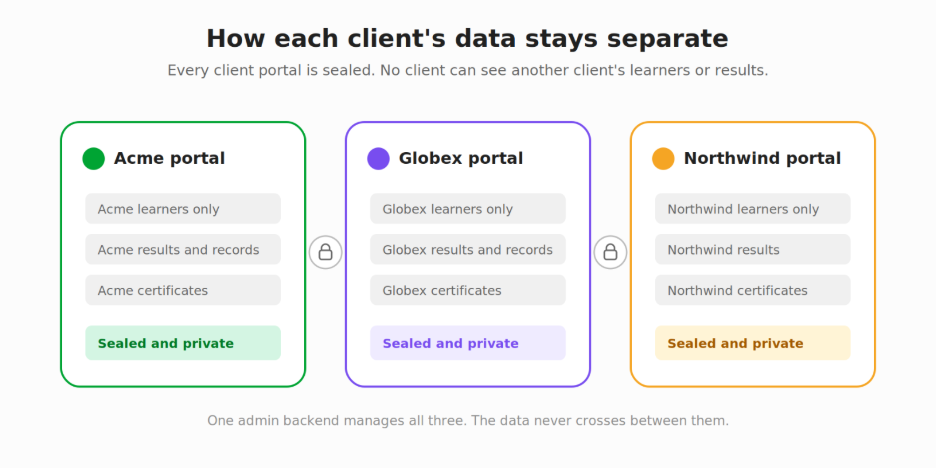
This is not just good practice. For corporate clients, it is often a contractual requirement. A bank training its staff does not want a competitor's training provider able to see its learner list. A client in a regulated industry needs to know their delegate records stay private and audit-ready.
Generic LMS platforms built for a single organisation were never designed for this. They assume everyone in the system belongs to one company. When you serve many clients, that assumption becomes a liability. A platform with isolated client environments removes the risk by design.
Risknowlogy, a TÜV SÜD approved course provider delivering IEC 61508 and IEC 61511 functional safety training globally, runs its training operation on Blend-ed. For a provider serving engineers from many different employers, keeping each client's records clean and separate is not optional. It is how the business stays trusted.
Can corporate clients manage their own learners and see their own reports?
Yes. Each corporate client can get an admin login scoped to only their own learners, and they can pull their own reports without going through you. Provider-side reporting and client self-serve reporting run side by side.
This is the part that gives the provider their time back. Without it, every client request becomes your job. “Can you add five new starters?” “Can you send me last quarter's completion report?” Each one is a small task that adds up across dozens of clients.
When a client has their own admin access, they handle their own learner list. When they have self-serve reporting, they pull their own numbers whenever they want. You set the boundaries, and they operate inside their own walled space.
Admin and scheduling work can eat a large share of a training team's time. Handing safe, scoped control to clients is one of the cleanest ways to cut that load. You stay in control of the platform. They get the day-to-day independence they want.
Branch accounts versus true client portals: what is the difference?
Not every platform that claims multi-client delivery works the same way. Some use branch or sub-account models, where clients are divisions inside one shared system. Others use true isolated portals, where each client operates in a genuinely separate environment.
The difference shows up at scale. A branch model can blur the lines between clients, and the separation often depends on careful admin settings rather than the architecture itself. As you add clients, the risk of overlap grows, and the admin burden grows with it.
A true portal model keeps each client isolated by design. Branding, data, admin access, and reporting are separate from the start, not configured separately each time. For a provider planning to grow past a handful of clients, that distinction decides whether the platform scales with you or slows you down. The difference between multi-tenancy and white-labelling is worth understanding before you commit, because the two are often confused and they solve different problems.
Conclusion
Branded client portals are the operational backbone of a multi-client training business. The question is not whether you can add a client's logo. It is whether each client gets a walled, branded, self-administered space with their data kept to themselves.
That is what corporate clients are really buying when they ask for “their own portal.” Branding depth, data isolation, scoped admin access, and self-serve reporting matter most. Your clients sit under your branded domain, each in their own private space, and that is exactly what they came for.
If you run a training business serving multiple corporate clients, this is worth seeing in practice. Book a demo and we will walk through how branded client portals would work for your specific client structure.
Frequently Asked Questions
What is a branded client portal in an LMS?
A branded client portal is an isolated learning environment inside a multi-tenant LMS, set up for one corporate client. It carries the client's branding, holds only their learners, and keeps their data separate from every other client. Training providers use portals to serve many clients from a single platform without mixing anyone's data.
Can each corporate client have their own logo, certificates, and mobile app?
Yes. In Blend-ed, each client portal can brand the logo, colours, certificates, email templates, and the mobile app. This means a learner sees the client's brand from login through to the certificate they download, with no vendor branding in between.
What does the web address look like for each corporate client?
As the training provider, you get your own custom domain. Each of your corporate clients gets a branded portal that sits under that domain, with their own branding, learners, and certificates inside. Your clients do not get a separate domain of their own, but they get a fully branded private space, which is what corporate clients actually want.
Can corporate clients access their own reports without going through the provider?
Yes. Each client can have an admin login scoped to only their own learners, plus self-serve reporting. They manage their own learner list and pull their own reports, while the provider keeps overall control of the platform. This cuts the provider's day-to-day admin load significantly.
How is a client portal different from a sub-account or branch?
A sub-account or branch is a division inside one shared system, where separation depends on admin settings. A true client portal is isolated by design, with separate branding, data, admin, and reporting from the start. The portal model keeps clients cleanly separated as you scale, which branch models can struggle to do.