Blend-ed Logo
Platform
The Platform
Everything in one AI-first LMS

Explore the tools that power create, deliver, and analyze.

Learning ExperienceCourse StudioAnalyticsDiscoverDiscussionCalendarLearning Experience
Overview
Create
Courses and sessionsAI course creatorPrograms and learning paths
Deliver
Training deliveryLearner experienceAI tutorMobile appCommunity and engagement
Operate
Scheduling and bookingCohorts and enrollmentAttendance trackingTrainer management
Sell
Selling and e-commerceCorporate clientsMulti-organization managementWhite label and branding
Certify
Assessments and gradingCertificatesCompliance and auditSkills and competencies
Manage
Analytics and reportingCommunication and notificationsAdministrationMCP serverIntegrations and developer tools
Services
Open edX® Installation & Hosting Open edX® CustomizationInstructional Designing

By delivery format

  • Self-paced courses
  • Live online training
  • Classroom training
  • Blended programs

By use case

  • Corporate and closed cohorts
  • Continuing education and recertification

By industry

  • Functional safety
  • Healthcare and CME
  • Standards and certification
  • Consulting
Resources
Learn
Blog
ColabCoLab Community
Glossary
FAQs
Multi-tenant LMS FAQ
Compare
Blend-ed vs Academy of Mine
Blend-ed vs Arlo
Company
About
Career
Contact Us
Tools
Open edX® AI Course Creator
Open edX® AI Plugin
Interactive XBlock Content Generator
Open edX® MCP
LMS Comparison
Read more
Best LMS for external training in 2027 (for training providers)
Compare 8 LMS platforms for external training in 2027: client portals, selling seats, live sessions, certificates and how each one counts outside learners.

Professional Training
Read more
Best CME LMS for accredited providers in 2027, checked against ACCME's own list
A worked example of how to shortlist a CME LMS, using ACCME's public list of Premier Technology Partners and six checks you can run on any vendor.
Pricing
Book a demo
Book a demo
Blend-ed, an official Open edX partner
Email templates

Rewrite every system email in your own words and brand.

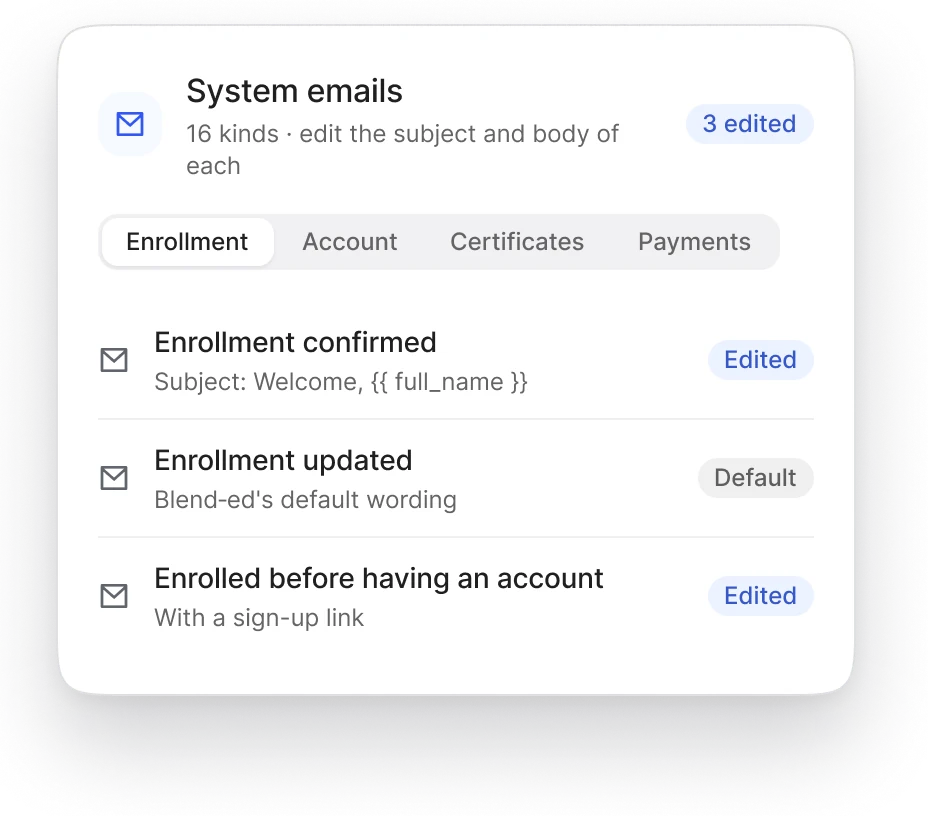
Blend‑ed sends 16 kinds of system email. Edit the subject and body of each one, add fields that fill themselves in, and see the result before you save.

Book a demo

Start free trial

The emails you can edit.

Group

Emails

Enrollment

Enrollment confirmed · Enrollment updated · Enrolled before having an account, with a sign-up link

Account

Invitation · Account created · Added to your organization · Password changed

Certificates

Certificate earned, with its link · Certificate expired, with the date and a link back to the course

Payments

Guest purchase, with what was bought and an account link · Subscription payment failed, with the plan, amount and a link to update the card

Support

Support ticket update, with its type, priority, description and link

Your messages

Custom broadcast, with its title, message and button

The other three are internal notices, such as a mobile app crash alert.

Fields that fill themselves in.

Field

Fills in

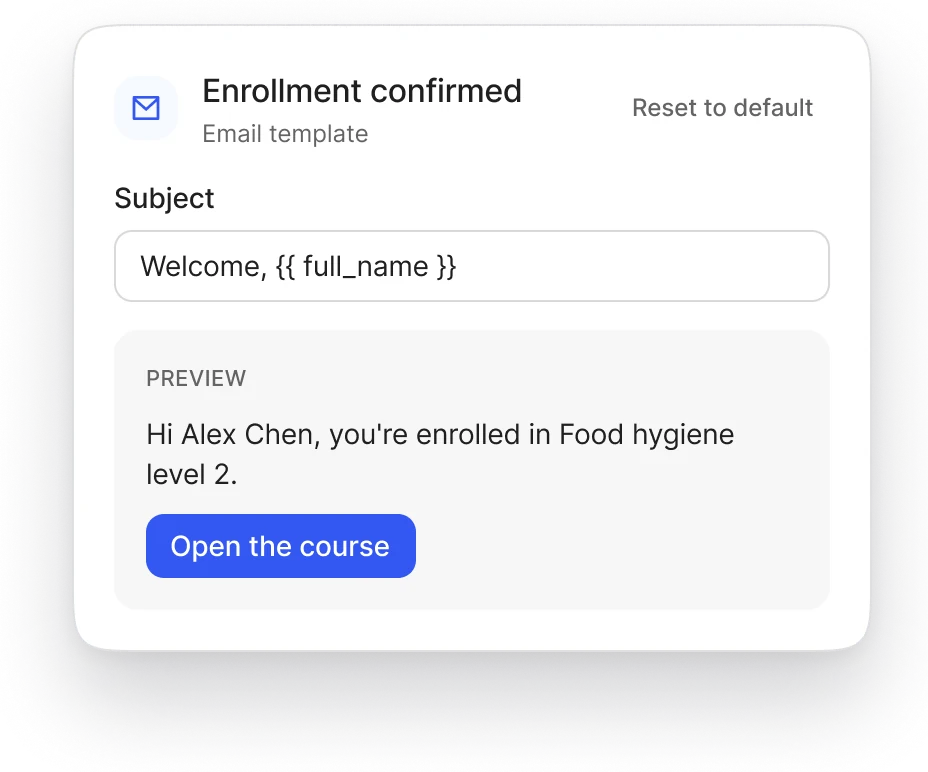
{{ full_name }} and {{ email_address }}

The learner's name and email

{{ course_name }} and {{ course_url }}

The course and a link to it

{{ platform_name }} and {{ org_name }}

Your platform and your organization

{{ logo_url }}

Your logo

{{ cta_button }}

The email's main button

{{ contact_mailing_address }} and {{ reply_to_email }}

Your mailing address and reply-to address

Each email also has its own fields, such as the certificate link or the expiry date.

How editing works.

Subject and body: edit the subject line and the email's HTML, with a preview beside it showing what the learner will see.

Click to insert: pick a field from the list under the editor.

Reset to default: go back to Blend‑ed's wording at any time.

Each academy its own: every organization in your account keeps its own wording and logo.

Wording, not sending: templates set what an email says. Your notification settings decide whether it's sent, and on which channels.

Related.

Part of Communication and notifications: every message Blend‑ed sends.

White label and branding: your brand on every screen, email and certificate.

Automated reminders: the messages sent before each date.

See your welcome email in your own brand.

We'll rewrite one of your emails with you in the demo and preview it as your learners will see it.

Book a demo

Start free trial

Need a second opinion?Ask AI about Blend-ed
  • ChatGPT
  • Claude
  • Perplexity
  • Google AI Mode
  • Grok
Blend-ed Logo
Powered by Open edX
4.9
Solutions
  • Functional Safety Training LMS
  • CME LMS
  • LMS for ISO Training Companies
Features
  • AI Course Creator
  • White Label LMS
  • Explore Features
  • Learning Management System (LMS)
Industries
  • Consulting
Resources
  • Tools
  • Blog
  • Glossary
  • FAQs
  • Multi-tenant LMS FAQ
  • Compare
Company
  • About Us
  • Career
  • Pricing
  • Contact Us
  • AI Info
Download from Google Play StoreDownload from Apple App Store
Privacy PolicyRefund PolicyTerms of Service
Blend-ed © 2026. All Rights Reserved