Schedule your courses, programs and sessions in one training calendar.
Run courses and programs in dated batches, schedule classroom and live online sessions with trainers, venues and seats, and take bookings from learners and corporate clients in one LMS.
 Tom KellerBasic life supportRoom 2Working at heightRoom 4
 Lena MüllerFood hygieneRoom 2 · clashLive Q&AOnline

Every date is its own small product. Today it runs on a spreadsheet, a form and an inbox.
Run courses and programs in batches.
Run the same course or program several times a year, such as an October and a January intake, or keep it always open. Each batch has its own:
- Start and end dates
- Enrollment window and seat limit
- Live online and classroom session dates, with their trainers
Learners pick the batch that suits them, or a corporate client books its staff into a private batch.
Run each session on one date or many.
Set up a session once, then choose how it runs:
One-off sessions: a single date.
Repeating sessions: the same training on several dates, for learners to choose from.
Session series: connected parts, and learners attend every part.
Multi-day training: a workshop across several days, with attendance recorded for each day.
Set the timeline inside each batch once.
Set release dates and deadlines from the batch start date or from the day each learner joins. Every new batch gets its own dates, with nothing to rebuild.
Release dates: open content on Day 1, 3 and 7, or on dates you choose.
Guided paths, scheduled release and prerequisites →Deadlines: for assignments and exams, with extra time for one learner when they need it.
Self-paced access: each learner gets their own access period, such as 90 days, and due dates they can reset in one click if they fall behind.
Keep trainers, venues and dates organized.
See every batch, session and deadline in one training calendar, with trainers, rooms and bookings.
Trainer scheduling
Assign a trainer to each session date, check their availability, and see every trainer’s week.
Venue and room management
Save your venues, rooms, capacities and equipment once, and reuse them for every session.
Venue and room management →Booking conflicts
Get a warning when a trainer, room or piece of equipment is already booked at that time.
Let individuals and corporate clients book training.
Individual learners
Learners choose a batch or a session date and book a seat. They can change a session date before the booking cutoff, or book a make-up date if they miss one.
Flexible session booking →Corporate clients
Client administrators book their employees onto batches and session dates. Reserve sessions or seats for one client or one batch.
Your training team
Staff book on behalf of learners, and every change is recorded. Set when booking opens and closes, and release reserved seats you don’t need.
Sell a session on its own
A one-day refresher or a workshop can be its own product, with its own price, without a course around it.
Session →Give learners their own training schedule.
Each learner sees their own schedule:
- Their batch’s start and end dates
- Session dates and start times, in their own time zone
- The venue, room and map, or the live online session to join
- Release dates and upcoming deadlines
- Certificate renewal dates
- Reminders before each date and deadline
Learners add their dates to Google, Outlook or Apple Calendar, and when you move a date, their calendar updates too. They know where to be without contacting your team.
Tom Keller · Room 2 · 11 of 12Lena Müller · Online · 18 of 25Tom Keller · Room 4 · 9 of 16Lena Müller · Room 2 · 14 of 16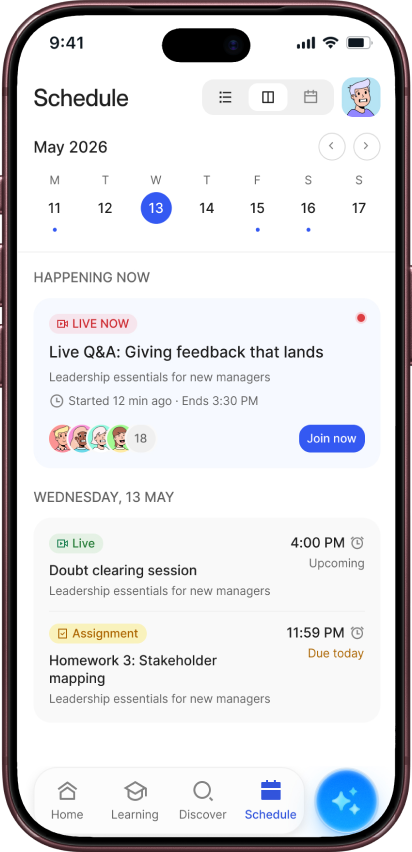
Related features.
- Cohorts and enrollment: who is in each cohort and how they enroll.
- Programs and learning paths: courses, sessions and exams in one program.
- Trainer management: trainer profiles, availability and workload.
- Attendance tracking: attendance for classroom and live online training.
- Corporate clients: training for each client organization.
- Communication and notifications: reminders, and announcements scheduled for later.
- Selling and e‑commerce: sell batches, sessions and courses online.
See how your training schedule works in Blend‑ed.
Show us your courses, batches, session dates and how people book. We’ll walk you through running them in Blend‑ed.