Build a program from your courses and sessions in one screen.
The program builder puts published courses and live online or classroom sessions in order, with a rule for each stage, a completion rule, a certificate and a price. It checks the program before it goes live.

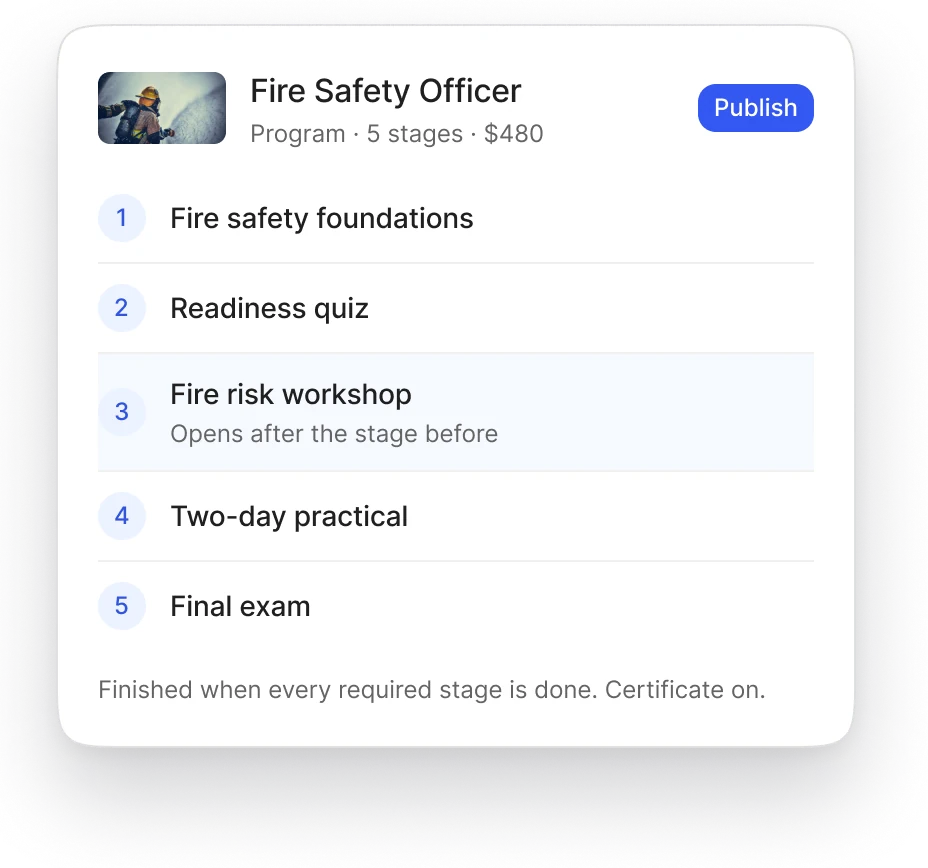
The parts of a program.
1
Program details
The name, a short description of up to 200 characters, a longer description, learning outcomes shown as bullets on the program page, the expected time to complete and hours per week, and an image (PNG, JPG or WEBP, up to 4.77 MB) that AI can make for you.
2
Stages
Published courses and sessions, in the order learners take them. Drag a stage to move it. A program holds only courses and sessions, so a single video goes in as a one-lesson course. The builder never edits a course: opening one takes you to its own editor.
3
Each stage's settings
Required or optional, its unlock rule, and the plan each course uses when the program is sold under one of its plans. An optional stage never blocks and never counts toward completion.
4
Finishing
What completes the program, and whether it issues a program certificate, which is off by default.
5
Price and plans
A one-time price, a monthly or yearly subscription, or both, and up to four plans, each with its own price and certificate setting. Publish it to your catalog, or make it invite only.
6
Publishing
Blend‑ed checks the program first. A rule that points to a later or optional stage, a course that isn't published, or a session that isn't set up stops it, and the reasons are listed. Each publish is kept as a numbered version. Changes reach learners already enrolled at no extra charge, and learners who finished keep their completion and certificate.
After launch.
Each program has its own tabs: an overview of enrollments, progress and revenue, its courses, its learners and pending invitations, fees and transactions, the staff who help run it, and reviews. A course a learner reaches twice, on its own and in the program, is one enrollment with one progress record. Deleting a program ends enrolled learners' access at once.
Related.
Part of Programs and learning paths
Unlock rules and gating: the rule for each stage.
Completion rules: what finishes the program.
Session: the live online and classroom stages.
Multiple plans per course: up to four ways to buy it.
Cohorts and batches: run the program in dated batches.

Map one of your qualifications into a program.
Show us its courses, sessions and exams. We'll build the program with you in the demo.