

Training teams can run one course for multiple cohorts without duplicating its content. In Blend-ed, each scheduled run is called a batch.
Each batch can have its own dates, instructors and seat limits. The course content remains in one shared place.
This model helps organizations manage recurring training while reducing the work of maintaining separate course copies.
Why copying a course for each cohort creates problems
Copying a course for each cohort can create additional work as the number of training runs grows:
- Content changes can drift. A correction made in one copy does not automatically appear in the others.
- Reporting can become fragmented. Teams may need to combine completion and grade data from separate course copies.
- Administration increases. Each copy needs its own settings, certificates and enrolment checks.
- The source becomes unclear. Teams need to decide which copy to review, approve and update.
A course contains the learning material. A batch defines who takes the course, when it runs and the conditions for that run.
How Blend-ed runs one course across multiple batches
In Blend-ed, a batch is a scheduled run of a course with its own dates, seats and people. Multiple batches point to the same course content.
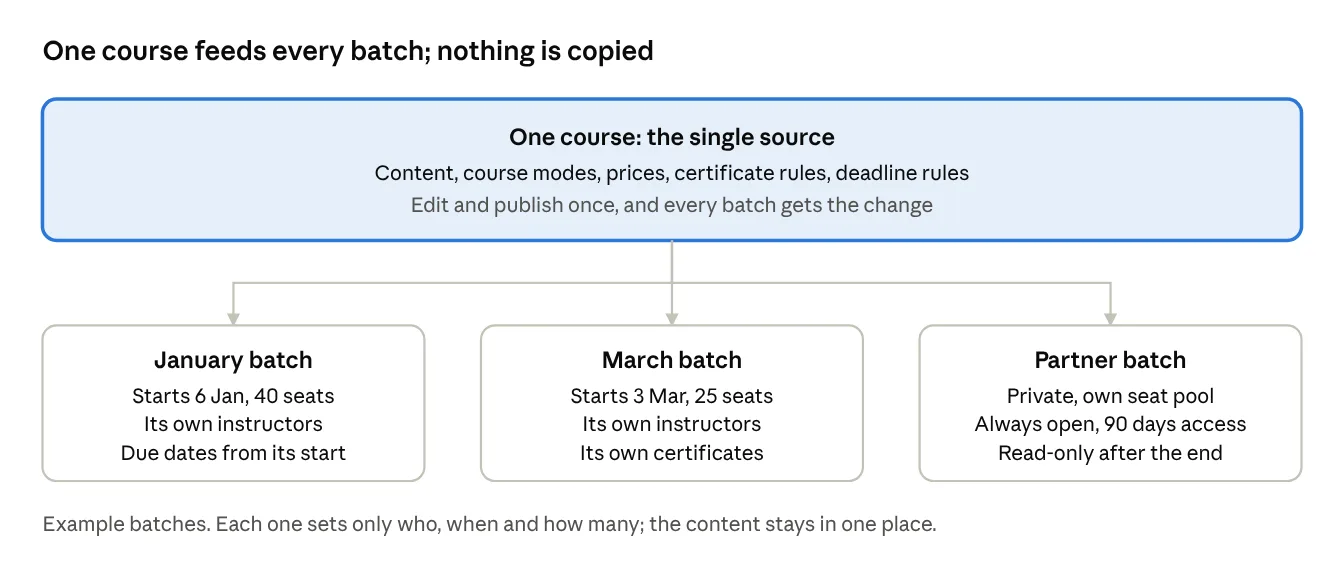
The model has three parts:
- The course contains the content. Blend-ed is built on Open edX, and each batch uses the same course sections, units and assessments.
- Course modes define learning options. For example, a course may offer Standard and Premium modes with different prices, content access and certificate settings. These options are configured on the course and shared by its batches.
- Batches define the runs. Each batch has a name, code, schedule, enrolment window, seat limit and assigned instructors.
A course can also run without batches. Teams can turn off Run this course more than once so learners join the course directly, then enable it later if additional batches are needed.
What each batch controls and what the course shares
Course settings control what learners study. Batch settings control the schedule, participants and capacity for each run.
| Area | Set once on the course, shared by every batch | Set per batch |
|---|---|---|
| Content | Sections, units, problems, videos. A single publish reaches every batch. | Nothing to copy |
| Schedule | The deadline rule, such as "due 14 days after the batch starts" | Start and end dates, enrolment window, time zone and any set access period |
| Deadlines | The rule itself | The actual due dates, worked out from each batch's start date |
| People | Course staff | Assigned instructors, seat limits and whether the batch is public or private |
| Modes and pricing | Up to four course modes, such as Standard or Premium, with their prices and certificate settings | Learner places and grants for this batch |
| Certificates | Whether a course mode includes a certificate | Certificates issued or revoked for each learner's attempt in this batch |
| After the end | Nothing | Read-only access or no access |
| Reporting | Course reports roll up every batch | A per-batch view for that group |
For example, an assessment may be due 21 days after the batch starts. A January batch starting on the 6th and a March batch starting on the 3rd each receive deadlines based on their own start date.
Shared content requires a publishing process. Before changing an assessment used by an active batch, teams should agree on who reviews the update and how instructors will communicate it. Organizations that need historical records should establish what evidence of the delivered content must be retained.
How shared courses and batches support training teams
For course authors: Content is maintained in one shared course. Authors should plan updates around the batches already using the material.
For administrators: A new run can be created as a batch. Administrators set its dates and seat limit, then assign instructors.
For instructors: Each batch has assigned instructors. A trainer assigned to the Riyadh batch works with that group of learners.
For learners: Dates, deadlines and access follow the batch schedule. Certificates are tied to the learner's attempt in that batch.
For leadership: Course reports bring results together across batches. A batch view allows teams to examine a specific group.
Run recurring training from one course
A shared course helps training teams maintain learning content in one place. Separate batches organize the people, schedules and capacity for each delivery.
See how batches fit your program. Book a walkthrough with our team.