


Can a client buy 20 seats today and name the learners next week? An LMS features checklist helps you compare learning management systems against requirements like these before you buy. Use this one if you sell training to individuals or companies.
We reviewed 37 LMS and training management system (TMS) checklists. All 37 mention reporting. One asks whether each client company can run its own reports. If you sell to companies, ask to see two client accounts and check whose learners appear in each report.
Blend-ed publishes this guide and sells an LMS with training management built in. We excluded our own pages from the 37 checklists we reviewed.
Download the checklist (Excel) · Jump to the demo questions
For a quick check, pick the workflow your team handles most often and ask each vendor to show it with sample data. If a step is essential to your business, flag it until you've seen it work.
The LMS features checklist for training companies
Start with how you sell and deliver training. Mark what your team needs from day one. For example, client-level reports may be essential if you sell to companies. A room calendar matters if you run classroom sessions.
Use the verdicts as a starting point. The second column shows how many of the 37 published checklists mention each feature. The Why column draws on onboarding calls with six training businesses that use Blend-ed. Use the Excel copy to track what each vendor can demonstrate.
Jump to Sell · Enroll · Organize clients and access · Schedule · Deliver · Assess and certify · Report and run the business · Standard features to confirm
Sell
| Feature | Lists that mention it (of 37) | Our verdict | Why |
|---|---|---|---|
| Online checkout | 26 | Must-have | Four of the six businesses needed a payment provider that works in their market |
| Coupons, bundles and subscriptions | 12 | Depends | Matters if you sell programs or memberships |
| Selling seats to client companies | 2 | Depends | Must-have if companies buy training for their staff |
| A public course catalog | 8 | Depends | Matters if learners find you online rather than through a sales team |
Enroll
| Feature | Lists that mention it (of 37) | Our verdict | Why |
|---|---|---|---|
| Bulk or automated enrollment | 23 | Must-have | Client companies send lists of names |
| Self-enrollment and online registration | 12 | Must-have | Individual buyers enroll themselves |
| Waitlists | 5 | Depends | Matters if sessions sell out |
| Enrollment from your website or CRM | 24 (CRM) | Depends | Two of the six sold on their own website or CRM first |
Organize clients and access
| Feature | Lists that mention it (of 37) | Our verdict | Why |
|---|---|---|---|
| Roles and permissions | 26 | Must-have | Trainers, admins and client admins need different access |
| White-labeling | 24 | Depends | Three of the six needed branding for each client |
| A portal for each client | 14 | Depends | Must-have if you train several client companies |
| Single sign-on | 27 | Depends | Usually a client's requirement, not yours |
Schedule
| Feature | Lists that mention it (of 37) | Our verdict | Why |
|---|---|---|---|
| Scheduling sessions | 25 | Must-have | Live and classroom dates are what many providers sell |
| Video conferencing integration | 23 | Must-have | Four of the six ran live sessions or classes |
| Trainer management | 10 | Depends | Matters once you have more than a few trainers |
| Venues and rooms | 9 | Depends | Matters if you run classroom training |
| Blended programs | 24 | Depends | Matters if one program mixes online and live parts |
Deliver
| Feature | Lists that mention it (of 37) | Our verdict | Why |
|---|---|---|---|
| Course authoring | 30 | Must-have | You'll build and update your own courses |
| Mobile learning | 32 | Must-have | Learners study on phones; two of the six also wanted their own branded app |
| SCORM and eLearning standards | 22 | Depends | Matters if you buy or already own packaged content |
| Multiple languages | 19 | Depends | Depends on your market; two of the six needed Arabic |
| AI features | 21 | Depends | Ask what each AI feature takes in, what it produces and who checks it |
| Gamification | 18 | Skip for now | Rarely decides a training seller's purchase |
| Social learning | 21 | Skip for now | Rarely decides a training seller's purchase |
Assess and certify
| Feature | Lists that mention it (of 37) | Our verdict | Why |
|---|---|---|---|
| Quizzes and exams | 30 | Must-have | Most certificates depend on a pass mark |
| Certificates | 30 | Must-have | The certificate is often what the learner paid for |
| Certificate expiry and renewal | 21 | Must-have | Renewals are repeat revenue |
| Practical and observed assessment | 15 | Depends | Matters for hands-on and safety training |
| CE and CPD credits | 4 | Depends | Must-have for licensed professions |
| Compliance tracking and audit trail | 29 | Depends | Must-have if a regulator or awarding body inspects your records |
Report and run the business
| Feature | Lists that mention it (of 37) | Our verdict | Why |
|---|---|---|---|
| Reporting and analytics | 37 | Must-have | Every list agrees, and so do we |
| Attendance tracking | 16 | Must-have | Two of the six tied attendance to the certificate |
| Notifications and reminders | 25 | Must-have | Session dates and renewals need reminders |
| Reports for each client | 1 | Depends | Must-have if you sell to companies |
| Invoicing | 6 | Depends | Must-have if companies pay by invoice or purchase order |
| Surveys and course evaluations | 14 | Depends | Matters if you report satisfaction to clients |
Standard features to confirm
| Feature | Lists that mention it (of 37) | Our verdict | Why |
|---|---|---|---|
| Integrations and API | 36 | Must-have | Connects your website, CRM and payment tools |
| Security and data privacy | 28 | Must-have | Clients and regulators will ask |
| Vendor support | 21 | Must-have | You need help fast when a session date is at stake |
| Learning paths | 29 | Depends | Matters if you sell programs of several courses |
| Accessibility | 18 | Depends | Required by some clients and public-sector buyers |
| Scalability | 27 | Depends | Matters if you expect fast growth in learners |
How to test LMS features in a demo
Give every vendor the same scenario and sample data. Pick questions from the table that match your must-haves.
- Mark your must-haves. Set aside features that don't apply to the way you sell or deliver training.
- Record what you saw. Use the notes column to distinguish a feature documented on the vendor's site from a workflow you saw in the demo.
- Follow up on every essential step you couldn't verify, even when a vendor showed most of the checklist working.
| Ask the vendor | Then ask to see |
|---|---|
| Can a client company buy seats before naming its learners? | A client admin buying 10 seats, assigning 3 and moving 1 to another employee |
| Can each client see only its own people? | Two client admin accounts side by side |
| How are CE credits calculated? | A learner's hours turning into credits on a certificate |
| Can a company pay by invoice? | An order paid by bank transfer, then the revenue report that includes it |
| Can attendance decide the certificate? | A learner below the minimum attendance, and the certificate held back |
| What stops a trainer or room being double-booked? | The same trainer booked on two sessions at once |
| What happens when someone buys on our website? | A test purchase creating the enrollment |
| Who can see records after a client's contract ends? | An expired client account and its training records |
Follow one learner from purchase to certificate
We designed this path with a US nursing continuing education provider. Use it to plan a demo that follows one learner's record from checkout to certification.
- A learner buys a course on the provider's GoHighLevel website.
- GoHighLevel sends the learner's email and course to Blend-ed through the API. Blend-ed enrolls the learner or sends an activation email for a new account.
- The design calls for collecting the learner's license number and type and printing both on the certificate.
- For an in-person class, the instructor marks attendance before the learner takes the final assessment.
- When the learner passes, the workflow issues a certificate and sends the completion back to GoHighLevel for renewal tracking.
Ask each vendor to run your version of this workflow. Check that you can follow the same learner record across every step.
What other LMS checklists miss when you sell training
These are the requirements worth a closer look when they apply to your business. The examples come from implementation calls with six Blend-ed customers.
Selling seats to client companies
Two of the 37 checklists cover selling seats to companies. Arlo's training management guide includes group bookings with several learners on one order.
Ask whether a company can buy seats before it knows who will attend. When you reassign a place, check that the seat capacity still reflects one booking.
A separate portal for each client company
Fourteen checklists mention separate client portals. A training reseller we worked with said its corporate customers wanted their own banners and footers as well as a logo.
Open a portal as a client admin. Check the course catalog, the learner limit and what happens to records when the contract ends.
Reports each client can download
Edly's requirements checklist was the only one in our sample to ask for reports by client company.
Ask whether each client can export their own attendance, results and certificate expiry dates. Test the export from a client account, where access is more limited than it is for the platform admin.
Continuing education and professional development credits
Four checklists mention continuing education (CE) or continuing professional development (CPD) credits.
Give the vendor two courses with different credit values. Ask to see the credits on a certificate and the total for one learner's renewal period. See the guide to choosing a continuing education LMS for more requirements to check.
Invoices and purchase orders
Six checklists mention invoicing. Five of those focus on training management. If clients pay by purchase order or bank transfer, ask the vendor to use that payment method in the demo.
Create a company order with a purchase order, record a bank transfer and find the payment in the same revenue report as card sales. See how training invoices are recorded in Blend-ed.
Attendance that decides the certificate
A provider that sells classes on subscription needed attendance from live classes to be recorded automatically. If attendance counts toward a certificate, test what happens to a learner who misses a required session.
Sixteen checklists mention attendance tracking. We counted mentions of attendance itself. You'll need to test whether the platform's attendance rules can hold back a certificate or assessment until your learner qualifies.
Trainers, rooms and waitlists
Only two of the 28 LMS checklists mention trainer management. Two mention venues. Across all 37 checklists, five mention waitlists.
Book the same trainer or room on two sessions and check when the conflict appears. Then fill a class, add a learner to the waitlist and check what happens when a seat opens. Use Blend-ed's session booking example to see what the learner needs to do next.
A payment provider that works in your market
Four of the six businesses we looked at needed a particular payment provider. One needed both Razorpay and Stripe so learners outside its home country could subscribe.
Pick a market you sell in and run a test payment in its currency. Find out where the money lands and whether you can test a subscription renewal if you sell one. You can use the Blend-ed checkout example to plan what to check.
The hand-off from your website or CRM
Twenty-four checklists mention CRM integration. Two of the six businesses we spoke to sold through their own website or CRM first. One needed its course-purchase invoices to sync to Zoho CRM.
Make a test purchase outside the LMS. Find the enrollment, then check which events go back to the CRM. Ask what your team would need to set up. See what Blend-ed's API and webhooks can connect.
Why published checklists leave these gaps
Twenty-three of the 37 checklists focus on employee training. Five focus on businesses that sell training. The chart shows who the rest were written for.
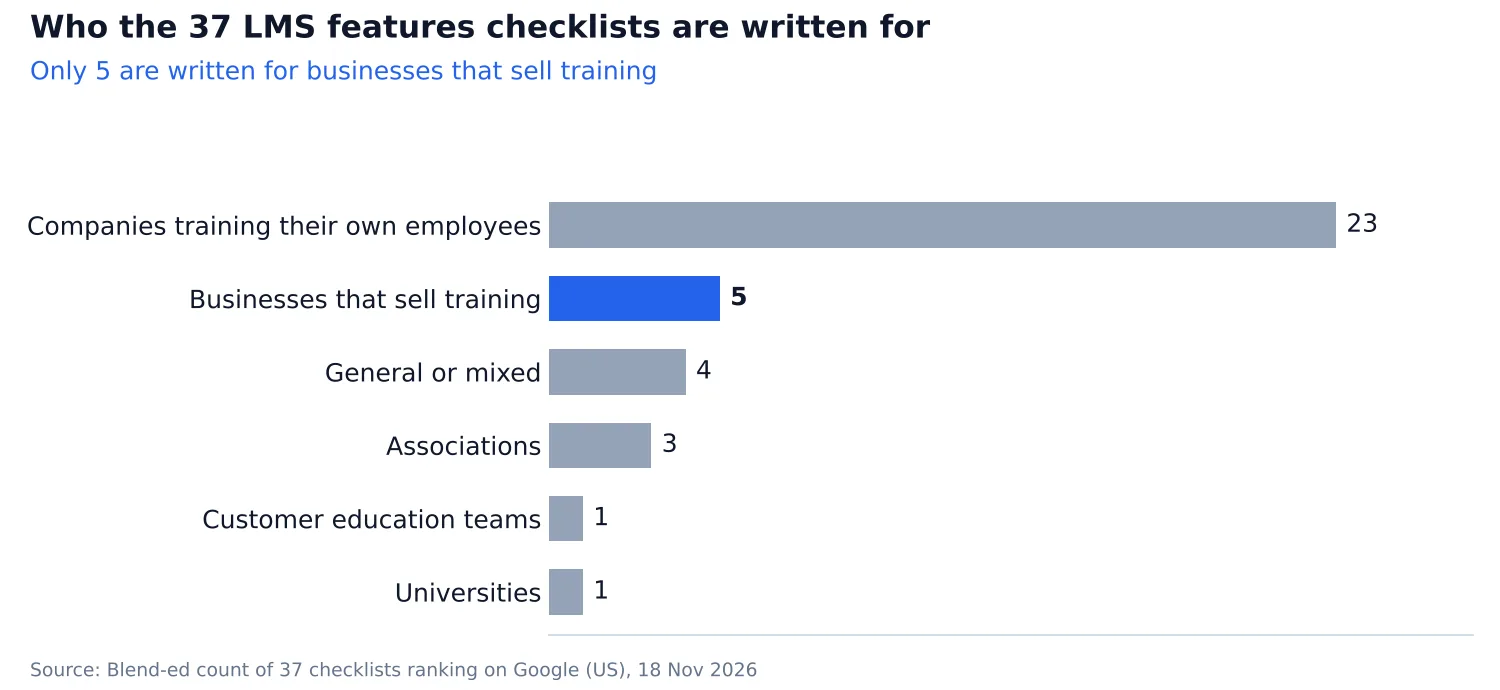
Vector Solutions' checklist marks course sales as unnecessary for all three use cases it covers. That fits an employer buying compliance training. If you charge for courses, ask how a payment turns into an enrollment.
LMS features vs TMS features
LMS checklists tend to cover the learning itself. TMS checklists are more likely to cover the work around it, such as scheduling trainers and issuing invoices.
| Feature | LMS checklists (of 28) | TMS checklists (of 9) |
|---|---|---|
| Trainer management | 2 | 8 |
| Venues and rooms | 2 | 7 |
| Invoicing | 1 | 5 |
| Selling seats to client companies | 0 | 2 |
| Course authoring | 26 | 4 |
| SCORM, xAPI and other eLearning standards | 20 | 2 |
| Gamification | 18 | 0 |
If your team sells courses, runs sessions and issues certificates, include both sets of requirements. The TMS and LMS comparison shows where the systems overlap.
Where Blend-ed may not be the best fit
If you train your own employees, start with a corporate LMS. If you run occasional live B2B training over Zoom, you may be able to manage with your current booking and delivery tools.
If you need a quick, self-serve setup for a handful of courses, consider a lighter platform. If upfront pricing matters, ask Blend-ed for a quote based on your learner numbers, delivery formats and clients.
If you sell to companies and individuals, deliver live and self-paced training, and issue certificates, see how the LMS for training companies is set up. Bring your checklist if you book a demo.
FAQs
What are the core features of an LMS?
Start with course authoring, mobile access, learning paths, assessments, certificates and reporting. Confirm the technical basics as well, including integrations, single sign-on, security and compliance tracking.
What are the functional and technical requirements for an LMS?
Functional requirements describe what your team needs to do, such as enrolling learners and issuing certificates. Technical requirements cover how the LMS connects, secures access and handles content. Check whether the vendor supports your identity provider and whether single sign-on is included in your quote.
What LMS features do training providers need?
Your delivery model determines what to add to the standard LMS features. Check the client buying and reporting process for B2B, attendance and room booking for classroom training, and renewal credits for licensed professions.
Can one system run self-paced and instructor-led training?
Yes, if the system keeps both formats in one program and learner record. Ask the vendor to show a learner finishing an online module, attending a live session and earning one certificate based on both.