Every learner's next step, with the status of each course, session and deadline.
The dashboard reads each learner's own record: what they bought, what their employers enrolled them in, and what's due. Every item shows where it stands and the action that fits.

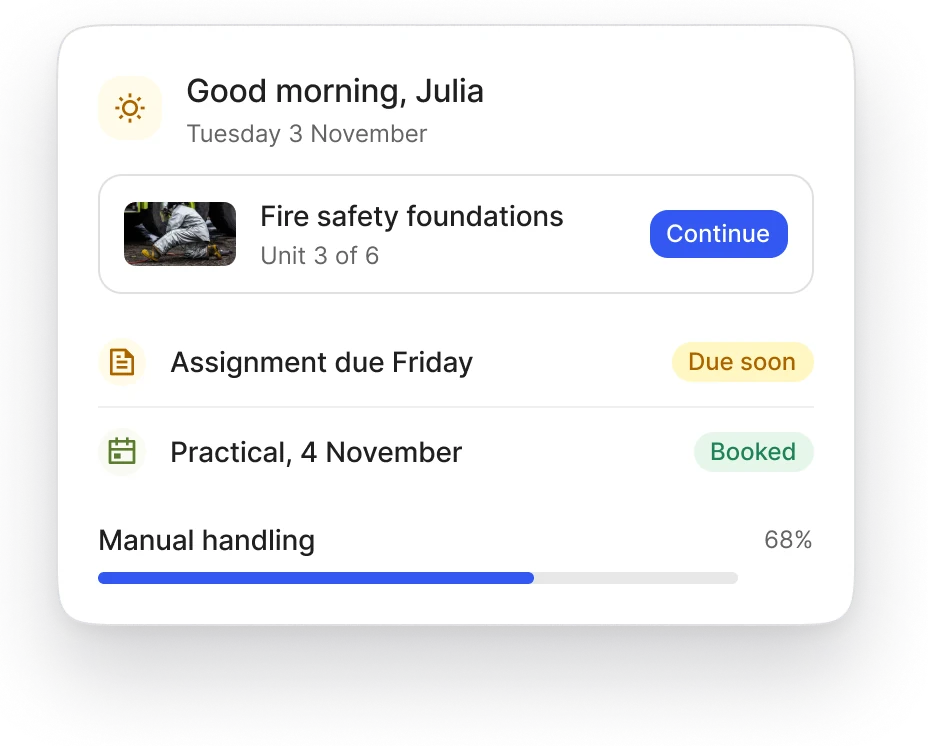
What each item shows.
Item
Status it can show
What the learner can do
Assignment or exam
Opens later · Due soon · Submitted, waiting for a grade · Overdue
Open it, or see the grade once it's marked
Session they book themselves
Locked · Not booked · Booked · Full · Moved · Canceled
Book a date, join the waitlist, or change it before the cutoff
Session their employer books
Not booked · Booked
Contact their manager, who books the date
Session on the day
Starting soon · Ended · Attendance pending
Join from the dashboard
Course or program
Not started · In progress · Completed
Resume where they left off, or view the certificate
Item with no date yet
Date to be set
See it in the schedule now; the date appears when you set it
Learners open the next item from the dashboard, and the platform checks access again when they get there.
Flexible session booking →One dashboard, whoever paid.
Bought and employer-booked training together: courses the learner bought and courses each employer enrolled them in sit side by side, with no switching between organizations.
One card for shared training: when two employers sponsor the same course or session, it shows once, with one booking.
History that stays: when an employer's access ends, the learner can still sign in, with their history, certificates and anything they bought themselves.
Separate academies stay separate: learners who belong to more than one of your academies switch between them from the menu.
Related.
Part of Learner experience: the learning screen, AI tutor and study tools.
Flashcards: the recap row on the dashboard.
Ask AI search: the assistant in the top bar.
Client organizations and portals: employers who enroll their staff.

See a learner's dashboard with your courses on it.
We'll show you one learner with a course they bought, training their employer booked and what's due next.