Show your courses, programs and sessions in one searchable catalog.
Your storefront inside Blend‑ed is one page: a banner at the top, then your catalog. Visitors find what they want, see the price in their own currency and buy.

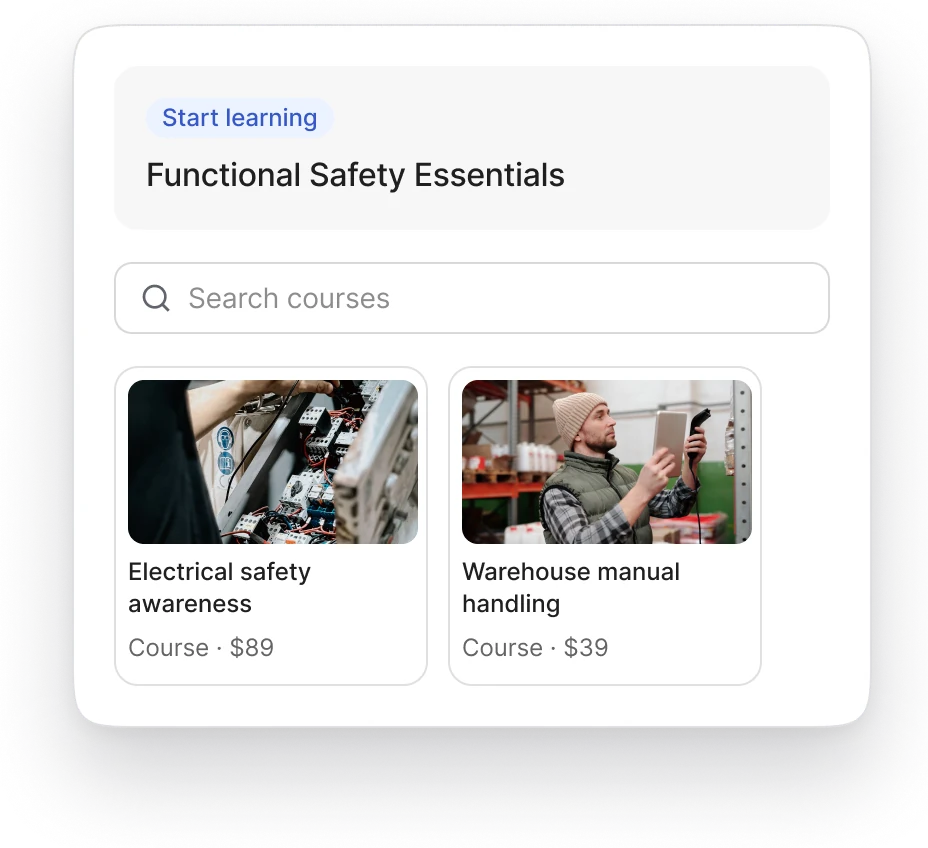
Choose what the banner shows.
Featured courses
One or two of your published courses, with their title, rating and review count kept up to date for you.
A badge of up to 15 characters, such as "Start learning".
A banner image for each course, ideally 1,200 × 630 pixels.
Your own message
A headline of up to 60 characters and a description of up to 150.
An optional image.
A background color from ten presets or any hex color, separate from your brand color.
A live preview shows the banner as you edit it.
The catalog under the banner.
What's listed: your published self-paced courses, programs and sessions sold on their own, with the upcoming dates of anything dated. Unpublished and invite-only courses stay out.
Finding a course: search by name, filter by type, price and tag, and sort the list.
Each card: the image, title, rating and price, a New label on recent courses, and the time a course takes.
Prices: in each visitor's own currency where you set regional prices. Regional pricing and multiple currencies →
Each card opens its course or program page, where learners choose a plan and buy. Course and program pages →
For signed-in learners.
The same catalog sits in each learner's dashboard. Learners save courses to a wishlist with the heart icon and find them again on their wishlist page. Employees of a corporate client see your public catalog only if their administrator allows it.
Related.
Part of Selling and e-commerce: plans, checkout, discounts and orders.
Headless storefront: the same catalog on your own website.
Checkout and payment gateways: what happens when a visitor buys.
Brand colors, logo and favicon: the look of the whole platform.

See your courses in a storefront.
Send us your course list, and we'll show it in a Blend‑ed storefront with your banner in the demo.